
At some point I realized I was paying for hosting every year on a personal blog that made zero money - but was eating more of my time through maintenance than through actual writing. WordPress doesn’t break all at once. It breaks slowly, through each update, each plugin conflict, each mysterious slowdown you can’t explain.
Why I Quit WordPress for Astro + Cloudflare Pages (And Cut My Hosting Bill to Zero)
This isn’t an A-to-Z technical tutorial. It’s a practical perspective from a developer who used WordPress for years, liked it, then slowly burned out on it - and finally found a much lighter stack using Astro, GitHub, Cloudflare Pages, and R2.
Table of Contents
- 1. The real problem with WordPress for personal blogs
- 2. The hidden costs you don’t notice right away
- 3. Why static blogs used to be hard - and why they’re not anymore
- 4. The stack I’m using and why I chose each piece
- 5. Honest comparison: WordPress vs Astro + Cloudflare
- 6. What WordPress still does better
- 7. Mistakes people make when migrating
- 8. FAQ
- 9. Why does Cloudflare still offer so many free features?
- 10. Conclusion
1. The real problem with WordPress for personal blogs
WordPress isn’t bad software. It’s powerful, flexible, and has a massive plugin ecosystem. The problem isn’t WordPress itself - it’s that WordPress was designed to do a lot of things, while a personal blog only needs one: publish posts.
1.1. The system is too heavy for what you actually need
A small WordPress blog typically drags along PHP, MySQL, Redis, a cache layer, a backup system, security plugins, image optimization plugins, and cronjobs - all just to render text and images. That’s classic over-engineering. You’re running a system with the complexity of a mini SaaS just to publish a few posts a month.
1.2. The familiar breakdown pattern
Plugin update breaks the site. Plugin conflict. CPU spikes for no reason. Bots constantly scanning wp-login. Malware injecting SEO spam. Backups getting bigger. Site slowing down. Hosting price goes up. Each of these happens in waves, not all at once, so you keep fixing and moving on - until the total cost in time and money exceeds whatever value the blog was delivering.
2. The hidden costs you don’t notice right away

The hidden costs you don’t notice right away
2.1. Financial costs that stack up
Hosting, backups, CDN, premium plugins, anti-malware, cache plugins - sometimes a VPS. Each line item looks small, but added up over a year the number becomes significant, especially when the blog isn’t generating any revenue.
2.2. Time cost - the one that never shows up on an invoice
This is the painful part. Every time the site has a problem, you lose 30 minutes to a few hours debugging. Multiply that by the number of incidents per year, and the total time is enough to write a dozen valuable blog posts instead. I was spending more time fixing my blog than writing it - and that’s the clearest signal a system has stopped working for you.
2.3. Mental cost - the stress of every update
The dread every time you click “Update All.” The need to check the whole site after every WordPress core update. This is the kind of cost that doesn’t appear on any invoice but accumulates steadily and chips away at whether you actually want to keep blogging.
3. Why static blogs used to be hard - and why they’re not anymore
3.1. The old barrier: you had to know a lot of code
Using Astro, Hugo, or any static site generator used to require knowing frontend development, React or Vue, Tailwind, build systems, and deployment. That’s why most non-technical bloggers defaulted to WordPress - familiar UI, one-click plugin installs, no terminal required.
3.2. AI changed that barrier completely
Now I just describe what layout I want, paste an error, ask AI to adjust a component or fix CSS - and get working code back. AI won’t make you a senior frontend engineer, but it’s enough to maintain an Astro theme, tweak UI, add components, fix responsive issues, and handle basic SEO. The technical gap between “want a blog” and “have a working blog” just got a lot smaller.
3.3. This trend is accelerating in 2026
The people moving away from WordPress aren’t the ones who want to learn Astro. They’re the ones who are tired of WordPress. And AI is the deciding factor that’s actually getting them to migrate instead of just thinking about it.
4. The stack I’m using and why I chose each piece
4.1. Astro - static output, minimal JavaScript, no database
Astro gives a personal blog exactly what it needs: static output, fast page loads, good SEO, minimal JavaScript, minimal attack surface, no database. The blog becomes what it was always supposed to be: HTML + CSS + content. There’s nothing to hack except static files.
4.2. GitHub - backup, version control, and rollback in one
I use GitHub as backup, version control, history, and rollback system simultaneously. If something breaks: revert the commit, redeploy. No more database restores, no more plugin debugging. It’s the simplest blog management workflow I’ve ever used.
4.3. Cloudflare Pages - eliminates hosting management entirely
Push to git, deploy. No VPS, no cPanel, no nginx to configure manually, no server patching, no security hardening. Faster than most shared WordPress hosting, and essentially free at personal blog scale.
4.4. Cloudflare R2 - image hosting without the headache
No more storing images in WordPress media library, no more worrying about disk space, no more manually optimizing images, no more migrating uploads when switching hosts. R2 makes image hosting a non-issue - and R2 egress costs are near zero when served through Cloudflare CDN.
5. Honest comparison: WordPress vs Astro + Cloudflare
| Criteria | WordPress.org | Astro + Cloudflare |
|---|---|---|
| Data ownership | Yes | Yes |
| Hack risk | High | Very low |
| Maintenance | High | Very low |
| Speed | Average | Very high |
| Long-term cost | High | Near zero |
| Theme customization | High | High (with AI) |
| Plugin dependency | Heavy | None |
| Update anxiety | High | None |
5.1. The biggest difference isn’t speed
Speed is the obvious win, but it’s not what I feel most after migrating. What I feel most is the absence of worry - no more dreading the update button, no more checking the site every morning, no more alerts at 2am because the site went down.
5.2. Astro’s biggest advantage: Perfect PageSpeed
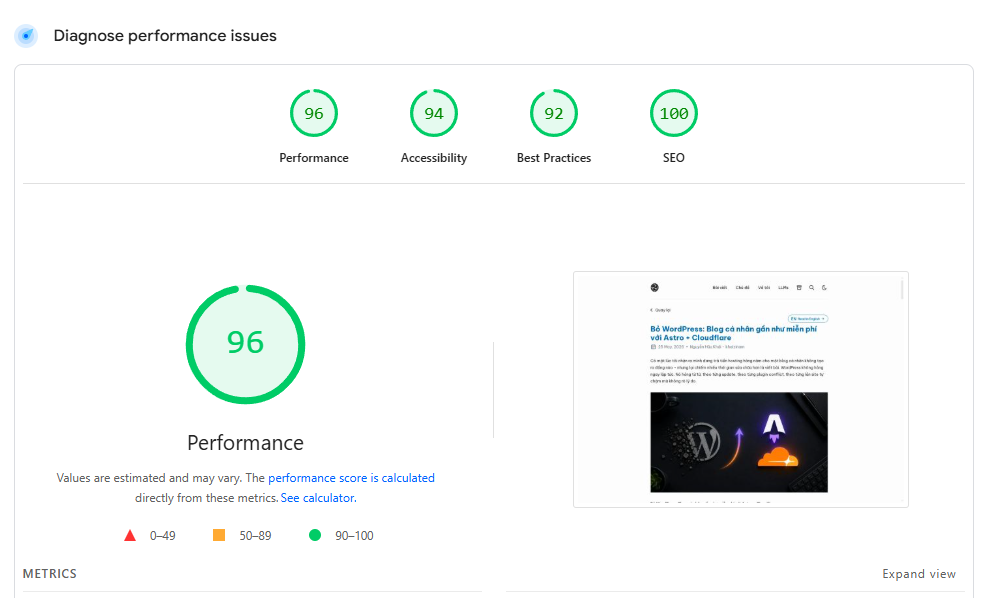
The cost to optimize technical SEO for Astro is virtually zero. Unlike WordPress - where you have to pay for premium optimization plugins and spend a lot of effort just to achieve a green score - Astro is inherently lightweight. Pages load incredibly fast, and PageSpeed scores almost always hit 95-100 on both Mobile and Desktop without any extra tweaking.
6. What WordPress still does better
6.1. WordPress is still the right choice for many use cases
News sites, ecommerce, membership sites, team content with multiple authors, complex CMS workflows requiring editorial approval - WordPress is still a solid and powerful choice. No technology fits every problem.
6.2. Small personal blogs are where WordPress starts to become overkill
When all you need is to write and publish posts, the entire WordPress ecosystem becomes overhead. That’s not a WordPress problem - it’s a problem of using the wrong tool for the job.
7. Mistakes people make when migrating
7.1. Migrating all old content before the theme is stable
Most people start by exporting all WordPress content into Astro immediately. The result: hours fixing formatting, broken image links, content that doesn’t render correctly. Better approach: get the theme stable, test with 5-10 posts first, then do the bulk migration.
7.2. Picking a complex template then getting stuck customizing it
Astro has many beautiful templates that are complex under the hood. Beginners pick the most impressive one and can’t figure out how to change anything when needed. Start with the simplest template, understand the structure, then build up - AI handles the rest.
7.3. Not setting up redirects from old URLs to new ones
WordPress and Astro often have different URL structures. Without proper redirects, all the SEO equity from your old blog disappears within weeks. Cloudflare Pages supports redirect rules via a _redirects file - configure this before switching DNS.
7.4. Skipping image optimization after moving to R2
Static sites don’t have auto-image-optimization plugins like WordPress. Images uploaded directly to R2 without resizing or compression will hurt Core Web Vitals. You need a workflow for processing images before upload - Squoosh, Sharp, or Cloudflare Image Resizing all work well.
7.5. Thinking “no database” means no backup needed
You should use GitHub to host your source code and blog posts. If you just upload files directly to Cloudflare, you could lose everything if Cloudflare experiences an issue or if you accidentally delete a file. GitHub acts as a highly secure backup. Make it a habit to commit regularly after writing or editing a post. Don’t worry about manual deployments, as Cloudflare Pages will automatically trigger a build every time you push a new commit to GitHub.
7.6. Forgetting to configure the www custom domain
Many people only configure their root domain (e.g., domain.com) and forget to add www.domain.com to the Custom Domains in Cloudflare Pages. This causes users trying to access the www version to hit an error or timeout, directly impacting user experience and significantly hurting SEO.
7.7. Forgetting to configure Cache TTL for R2
If you use R2 for image hosting, make sure to set the domain’s Cache TTL to 1 year. Many people leave it at the default 4 hours, causing browsers to unnecessarily re-download images. This negatively impacts PageSpeed scores and prevents file caching from working effectively.
8. FAQ
Can I use Astro if I don’t know how to code?
If you know basic Git and have used ChatGPT to ask technical questions, you have enough to run Astro for a personal blog. The hardest parts - initial setup and theme customization - are both doable with AI assistance. You don’t need to know React or frontend development deeply.
What does the Astro + Cloudflare stack actually cost?
For a personal blog with low to moderate traffic: Cloudflare Pages is free, R2 is free up to 10GB storage and 1 million requests per month, domain runs about $10-15 per year. Total cost is essentially just the domain - compared to WordPress which can run $50-200+ per year depending on hosting.
How long does migrating from WordPress to Astro take?
For a blog under 50 posts: 1-2 weeks working evenings. The most time-consuming parts are choosing a theme, setting it up, and handling old images. The content migration itself is actually fast if you use a script to convert WordPress XML to Markdown.
Will my SEO take a hit when migrating?
There’s risk if you don’t set up redirects correctly. With proper 301 redirects from old URLs to new ones and preserved content structure, SEO typically recovers within 4-8 weeks. Static sites have a significant Core Web Vitals advantage over WordPress - PageSpeed scores usually jump considerably after migration.
Is writing on Astro more inconvenient than WordPress?
Different, not necessarily worse. WordPress has a familiar visual editor. Astro uses Markdown - faster once you’re used to it, and easy to combine with AI for writing and formatting. If you want a more visual writing interface, you can pair Astro with Decap CMS or Keystatic.
How do you handle Comments and Search without a database?
Static sites can perfectly integrate dynamic features via third parties. For comments, you can use Giscus (based on GitHub Discussions) - like this blog uses, or alternatives like Cusdis and Disqus. For search, Pagefind is an incredibly lightweight library that fits perfectly with Astro.
How do you track visitors without WordPress plugins?
You can easily embed Google Analytics tracking codes into your Astro template (like this blog does). Additionally, Cloudflare Web Analytics is a fantastic built-in free option in your dashboard that is cookie-less, privacy-first, and doesn’t slow down your site since it doesn’t require third-party tracking scripts.
How can I write and publish posts from my phone while on the go?
This is a weakness of Jamstack compared to the WordPress mobile app. With Astro, the standard workflow requires sitting at a computer and writing Markdown. If you really want to write on mobile, you need to set up a headless CMS like Keystatic or use a Git client app (like Working Copy on iOS) to push Markdown files to GitHub.
How long is Cloudflare Pages free?
Forever, or until Cloudflare goes bankrupt.
How much daily traffic can it handle?
The number is massive, it performs even better than your typical VPS. Handling 250k visits per day is completely normal.
“250k hits a day to my static site and it’s never skipped a beat.” - via Reddit.
Another impressive comment:
“One of my clients hosts some airport websites, they get about a million hits a day and can push 50 million in 24h when the weather is bad. I use the Pro plan to get some extra features and have never had an issue with CF not being able to handle the traffic. Side note, my record was during the Crowdstrike outage, all the screens in the airport went down so everyone went to the website to check flight info. I hit 1.8 billion requests (real traffic) that day and it stayed up the whole time.” - via Reddit.
Can using Astro handle DDoS attacks?
Absolutely, and exceptionally well:
“One of my sites on the free tier got DDoS’d with over 1.4 billion requests and it handled it like a champ, so traffic volume is nothing to worry about! Zero downtime and 99.9% of requests were blocked/cached immediately!” - via Reddit.
What is the build limit?
A maximum of 500 builds/deployments per month (per project) when pushing new code to Git.
What is the file count limit?
A maximum of 20,000 files per site. For a small to medium personal blog, having 10,000 posts would already be amazing, so you practically don’t need to worry about this.
What is the maximum file size?
The size of each file cannot exceed 25 MB. To put that into perspective, 25 MB of plain text is roughly over 10 million words. That would be an exceptionally massive article, so your blog posts will likely never reach that limit!
What about Functions (Serverless)?
It includes 100,000 free requests for data processing functions per day.
9. Why does Cloudflare still offer so many free features?
Many people think Cloudflare is “burning money” to acquire users, but in reality, their model is the exact opposite: the more free users they have, the stronger Cloudflare becomes and the more they reduce their operating costs.
Currently, about 20% of the Internet sits behind Cloudflare’s network. This massive scale causes thousands of ISPs worldwide to directly peer with them instead of routing through transit networks. As a result, Cloudflare significantly reduces bandwidth costs - which is the most expensive part of running a global CDN.
Moreover, free users provide Cloudflare with incredibly valuable assets:
- Global traffic data.
- New DDoS and bot attack patterns.
- A real-world QA environment at Internet scale.
- Network effects that make them a default part of web infrastructure.
In other words:
Cloudflare’s free tier is not charity. It is a core part of their infrastructure and growth strategy.
Cloudflare only limits traffic that breaks their economics, such as large videos or high-bandwidth streaming. But for normal web traffic, the massive volume of free users actually helps them better optimize their systems, train their security models, and expand their influence faster.
That is why Cloudflare can continue offering so many free features that most other services would charge for very early on.
10. Conclusion
I didn’t quit WordPress because I hate it. I quit because I finally admitted that a personal blog doesn’t need a system this complex. Astro + GitHub + Cloudflare Pages + R2 isn’t a perfect stack for everyone - but for a small personal blog, it solves the three things I actually cared about: no maintenance, no hosting costs, no loss of ownership. AI fills in the technical gaps. The only thing left is writing - which is why I started blogging in the first place.