
JWT Interview Questions and Answers (2026)
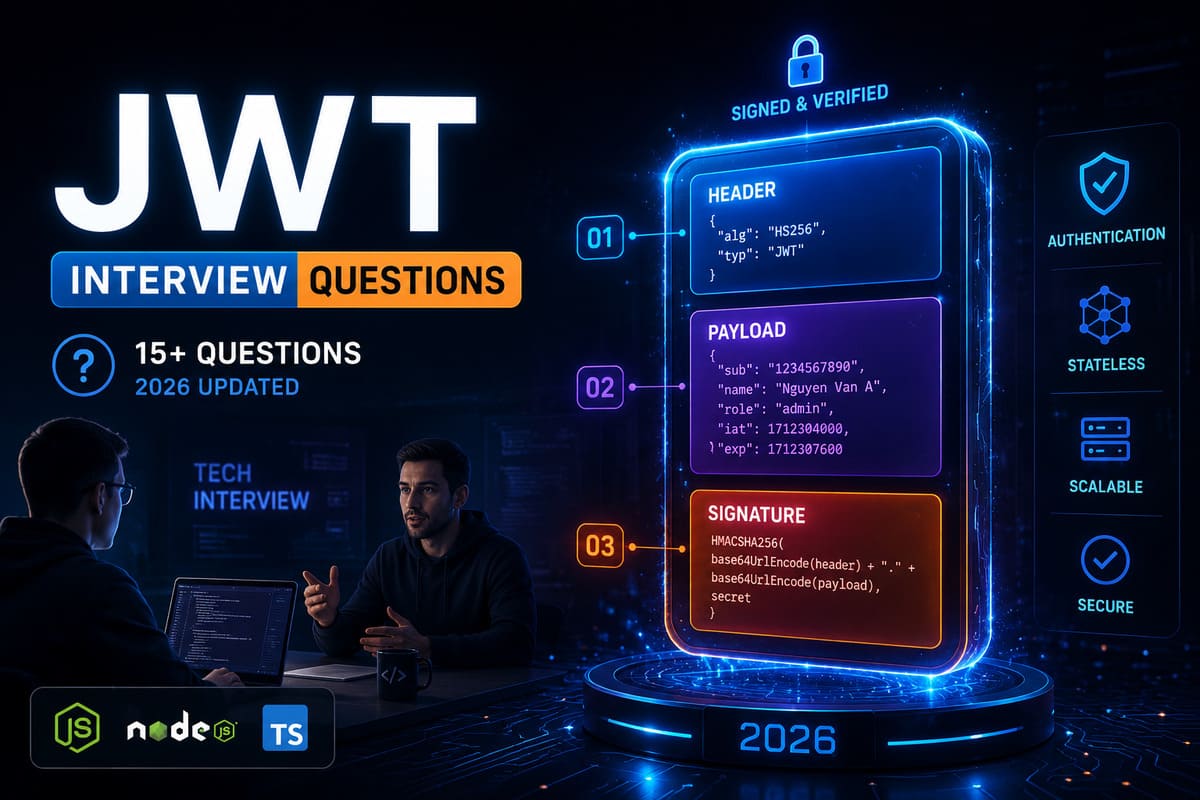
You’ve studied JWT, you know the basics - but the moment an interviewer asks “How do you revoke a JWT?”, “What’s the difference between HS256 and RS256?”, or “Where should you store tokens?”, you freeze. This guide covers every JWT interview question you’re likely to face, from fundamentals to security edge cases, with structured answers you can actually use in the interview room.
Table of Contents
- What is JWT? Foundation Questions You Must Answer Correctly
- JWT Structure - Header, Payload, Signature
- JWT vs Session: How to Answer in Interviews
- Advanced JWT Security Questions
- Access Token & Refresh Token - Production-Ready Flow
- 5 Common Mistakes When Answering JWT Interview Questions
- FAQ - Frequently Asked JWT Interview Questions
- Summary & Next Steps
What is JWT? Foundation Questions You Must Answer Correctly
The Core Concept
JWT (JSON Web Token) is an open standard (RFC 7519) for securely transmitting information between parties as a digitally signed JSON object. The key insight interviewers test: JWT is not encryption - it is integrity verification. Anyone can decode the payload if they have the token, but no one can forge it without the secret key.
Common foundation questions interviewers use to gauge your level:
- “What is JWT and why do we use it instead of sessions?”
- “Is JWT encrypted?”
- “How does token-based authentication work?”
The Right Answer
JWT is a string of 3 Base64URL-encoded parts joined by dots (.). It enables authentication and information exchange in stateless systems - particularly REST APIs and microservices. The server doesn’t need to store session state because all necessary information is carried within the token itself.
JWT Structure - Header, Payload, Signature
Breaking Down Each Part
A JWT looks like this: xxxxx.yyyyy.zzzzz
The Header contains the signing algorithm (alg) and token type (typ):
{
  "alg": "HS256",
  "typ": "JWT"
}
The Payload contains claims - information about the user and metadata. There are 3 types of claims:
- Registered claims: iss (issuer), exp (expiration), sub (subject), aud (audience)
- Public claims: defined by the community, must avoid naming collisions
- Private claims: agreed upon between parties, e.g. user_id, role
{
  "sub": "1234567890",
  "name": "John Doe",
  "role": "admin",
  "iat": 1516239022,
  "exp": 1516242622
}
The Signature is created by signing the Header + Payload with a secret key:
HMACSHA256(
  base64UrlEncode(header) + "." + base64UrlEncode(payload),
  secret
)
A classic follow-up: “Can the payload be read by anyone?” - Answer: Yes. Base64URL is encoding, not encryption. Never put passwords or sensitive data in the payload. If you need payload confidentiality, use JWE (JSON Web Encryption). You can inspect any JWT live at jwt.io.
JWT vs Session: How to Answer in Interviews
Choosing the Right Tool
This is a staple question in every backend interview. The Session vs JWT: Complete Theory Guide covers this in depth, but for interviews, here’s the comparison you need to remember:
- Session: Stateful - server stores session data, client holds only a session ID. Great for monolith apps, easy to revoke instantly.
- JWT: Stateless - server stores nothing, everything is in the token. Great for microservices and horizontal scaling, but harder to revoke before expiry.
When asked “When do you use JWT vs Session?” - the smart answer is: use JWT for REST APIs and distributed systems; use Session for traditional web apps requiring strict logout control.
Advanced JWT Security Questions
Common Attack Vectors
This section separates junior from mid-level developers. Interviewers will ask:
1. Algorithm Confusion Attack (alg:none)
An attacker modifies the header to “alg”: “none” to bypass signature verification. Fix: the server must whitelist allowed algorithms and never trust the alg field from the token header blindly.
2. JWT Secret Brute-Force
If the secret key is weak (e.g. “secret”, “123456”), an attacker can brute-force it offline since they have the header and payload. Fix: use a high-entropy secret (at least 256-bit random string), or switch to RS256 (asymmetric signing).
3. Token Theft via XSS
Storing JWT in localStorage makes it vulnerable to XSS attacks. Fix: store tokens in httpOnly cookies so JavaScript cannot access them. This is the current industry best practice.
4. Replay Attack
An attacker reuses a stolen but still-valid token. Fix: set short expiry (15 minutes for access tokens) and implement refresh token rotation.
RS256 vs HS256 - When to Use Which?
- HS256: Symmetric - the same secret for both signing and verifying. Suitable when only one service handles both operations.
- RS256: Asymmetric - private key for signing, public key for verifying. Ideal for microservices since other services only need the public key, not the secret.
Access Token & Refresh Token - Production-Ready Flow
Step-by-Step Production Flow
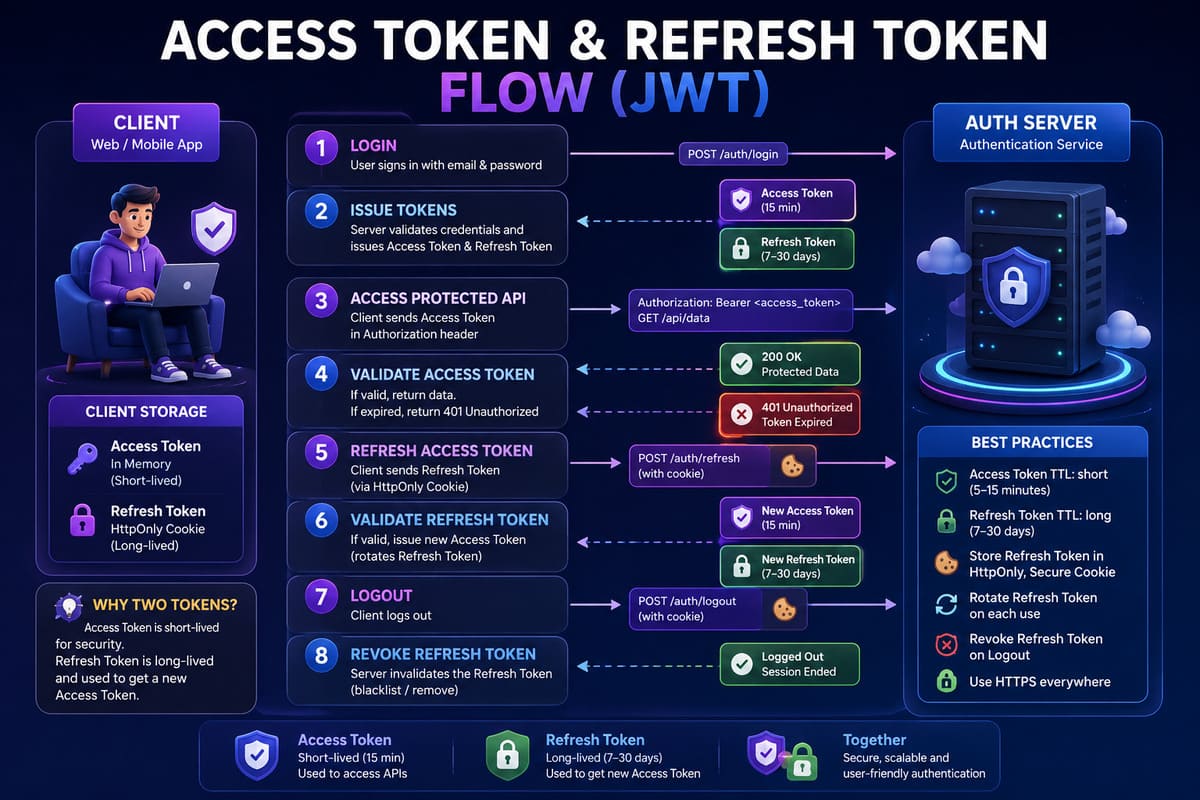
- User logs in with email/password.
- Server verifies credentials, issues an access token (TTL: 15 minutes) and a refresh token (TTL: 7–30 days).
- Access token sent in the
Authorizationheader; refresh token stored inhttpOnlycookie. - When the access token expires, client sends the refresh token to obtain a new one.
- Server verifies refresh token, issues new access token + rotates the refresh token (invalidating the old one).
- On logout: delete the refresh token from DB (blacklist or hard delete).
Real-world case study: A SaaS startup was using 1-hour access tokens with no refresh mechanism - users got constantly logged out, hurting retention. After switching to 15-minute access tokens + 30-day refresh tokens with rotation, session-related complaints dropped 80% in the first two weeks. Security also improved because a stolen refresh token is immediately detectable through the rotation mechanism.
5 Common Mistakes When Answering JWT Interview Questions
- Calling JWT “encrypted” → Fix: JWT is signed, not encrypted. Use “encode” and “verify signature” for precision.
- Not knowing how to revoke a JWT → Fix: JWT can’t self-revoke, but you can blacklist the
jtiin Redis, or rely on short-lived access tokens + revocable refresh tokens. - Storing JWT in
localStorageand calling it secure → Fix:localStorageis XSS-vulnerable. Best practice: store refresh tokens inhttpOnly + Securecookies. - Setting
exptoo long → Fix: Access tokens should have short TTL (15–30 minutes). Long TTL widens the attack window if a token is compromised. - Not knowing the difference between HS256 and RS256 → Fix: Understand symmetric vs asymmetric signing and when each applies (see section above).
For a deeper comparison of JWT vs Session in real systems, read Session vs JWT Interview Guide.
FAQ - Frequently Asked JWT Interview Questions
Can a JWT be decoded by anyone?
Yes. Anyone with a JWT can decode the Header and Payload since they are only Base64URL encoded, not encrypted. However, they cannot create a valid token without the secret key because the Signature won’t match. This is why you must never store sensitive data like passwords in the JWT payload.
How do you handle logout with JWT?
This is a deliberate trick question. JWT has no built-in revocation mechanism - the token remains valid until it expires. The three standard solutions: (1) Use short access token TTL (15 minutes) to minimize the exposure window. (2) Blacklist the jti (JWT ID) in Redis on logout. (3) Delete the refresh token in DB to block new token issuance. In production, combining all three is the most robust strategy.
Is JWT suitable for mobile apps?
Yes, and it’s one of the most common use cases. Mobile apps don’t have browser-managed cookies, so JWT in the Authorization header is the natural choice. Store tokens in Secure Storage (iOS Keychain or Android Keystore) rather than SharedPreferences or standard UserDefaults to prevent theft on rooted or jailbroken devices.
Why use RS256 instead of HS256 in microservices?
In a microservices architecture, multiple services need to verify JWTs. With HS256, every service must know the secret key - a significant security risk. With RS256, only the Auth Service holds the private key for signing; other services only need the public key to verify. The public key can be published openly (e.g., via a JWKS endpoint) without any security risk.
Does JWT size impact performance?
Yes, especially in high-frequency API calls. A JWT is significantly heavier than a session ID (a few bytes) because it carries embedded claims. A typical JWT is 200–500 bytes; a heavily loaded one can exceed 1KB. At 100+ API calls per second, this overhead accumulates. Best practice: only include claims that are actually needed per request - don’t serialize the full user profile into the token.
Where is the safest place to store a JWT?
Access tokens should be stored in memory (JavaScript variable) to prevent XSS; refresh tokens should be stored in httpOnly + Secure cookies to protect against both XSS and CSRF. Avoid localStorage for any token in a production environment.
Can JWT be used to authenticate WebSocket connections?
Yes. Pass the JWT as a query parameter during the WebSocket handshake (e.g., ws://api/ws?token=...), and verify it server-side immediately. Browser WebSocket APIs don’t support custom headers, so the Authorization header approach won’t work here. Use a short-lived token specifically for the handshake to minimize exposure.
Summary & Next Steps
To ace JWT interview questions, master four pillars: token structure (Header/Payload/Signature), real-world auth flow (access + refresh token), key security threats (alg:none, XSS, brute-force), and when to choose JWT over Session. Strong answers aren’t about reciting definitions - they’re about walking the interviewer through a real scenario you’ve built or deeply studied.
Before your next interview, implement a small JWT auth flow in your preferred language. There’s no substitute for hands-on experience.
Author: Nguyễn Hữu Khải - Backend Developer focused on authentication systems and API architecture. Writing at khaizinam.io.vn.
Last updated: April 21, 2026
Continue Reading - Backend Interview Series
Go deeper on authentication and authorization:
- Session vs JWT: Complete Theory - full breakdown of how each mechanism works, tradeoffs, and architecture patterns.
- Session vs JWT Interview Guide - curated interview questions with concise, interview-ready answers.
- Session vs JWT: Which Should You Choose? - decision framework for production systems.
- JWT Security Best Practices - the security checklist most developers skip.