
A junior developer portfolio is the collection of real projects, skills, and professional information you present so employers can evaluate your abilities - substituting for the work experience section of your CV that’s currently empty. For freshers and junior developers, a portfolio isn’t something that’s “nice to have” - it’s the only evidence you can offer to prove you can actually build things, not just recite theory from a textbook.
This guide answers the specific question most junior developers struggle with: what a portfolio needs to contain, which projects are worth including, how to present it so recruiters actually pay attention - and, just as importantly, what most people think they need but that actually doesn’t help at all.
Table of Contents
- 1. Why a portfolio matters more than a degree for junior developers
- 2. Before and after getting your portfolio right
- 3. Junior developer portfolio checklist - 6 components
- 4. Which projects belong in your portfolio - selection criteria
- 5. Stack-specific checklist: Frontend, Backend, Fullstack
- 6. 6 portfolio mistakes junior developers make
- 7. Real-world case study
- 8. FAQ
- 9. Summary
1. Why a portfolio matters more than a degree for junior developers
A Computer Science degree proves you studied. A portfolio proves you can build. For technical hiring managers, this distinction is everything. In the current Vietnamese IT hiring market, a fresher with a GitHub profile containing three complete projects and clear READMEs has a measurably stronger competitive position than a fresher who graduated with honors but has nothing to show.
1.1. What technical interviewers look at first
Technical leads and senior developers - the people who actually decide whether you get hired - typically look at three things in order: your GitHub profile (commit history, code quality), a project demo if there’s a live link, and then your CV. If your GitHub profile is empty or only has forks with no commits of your own, that’s a negative signal before they’ve read a single word of your resume.
1.2. A portfolio substitutes for internship experience
Not everyone has the opportunity to intern at a well-known company. A well-built personal portfolio is the most credible way to fill that gap. A self-made project may not match a production environment in every way, but it demonstrates proactive thinking, the ability to learn independently, and the ability to take something from an idea all the way to completion - which is exactly what companies want to see.
2. Before and after getting your portfolio right
2.1. Before - green GitHub, empty substance
A GitHub profile with thirty repositories where twenty-eight are forks, one is a copy-paste todo list tutorial, and one is a class assignment with no README. The commit graph is almost entirely grey. When a recruiter clicks through, there’s nothing to evaluate. The CV says “proficient in React and Node.js” but nothing in the GitHub profile verifies it.
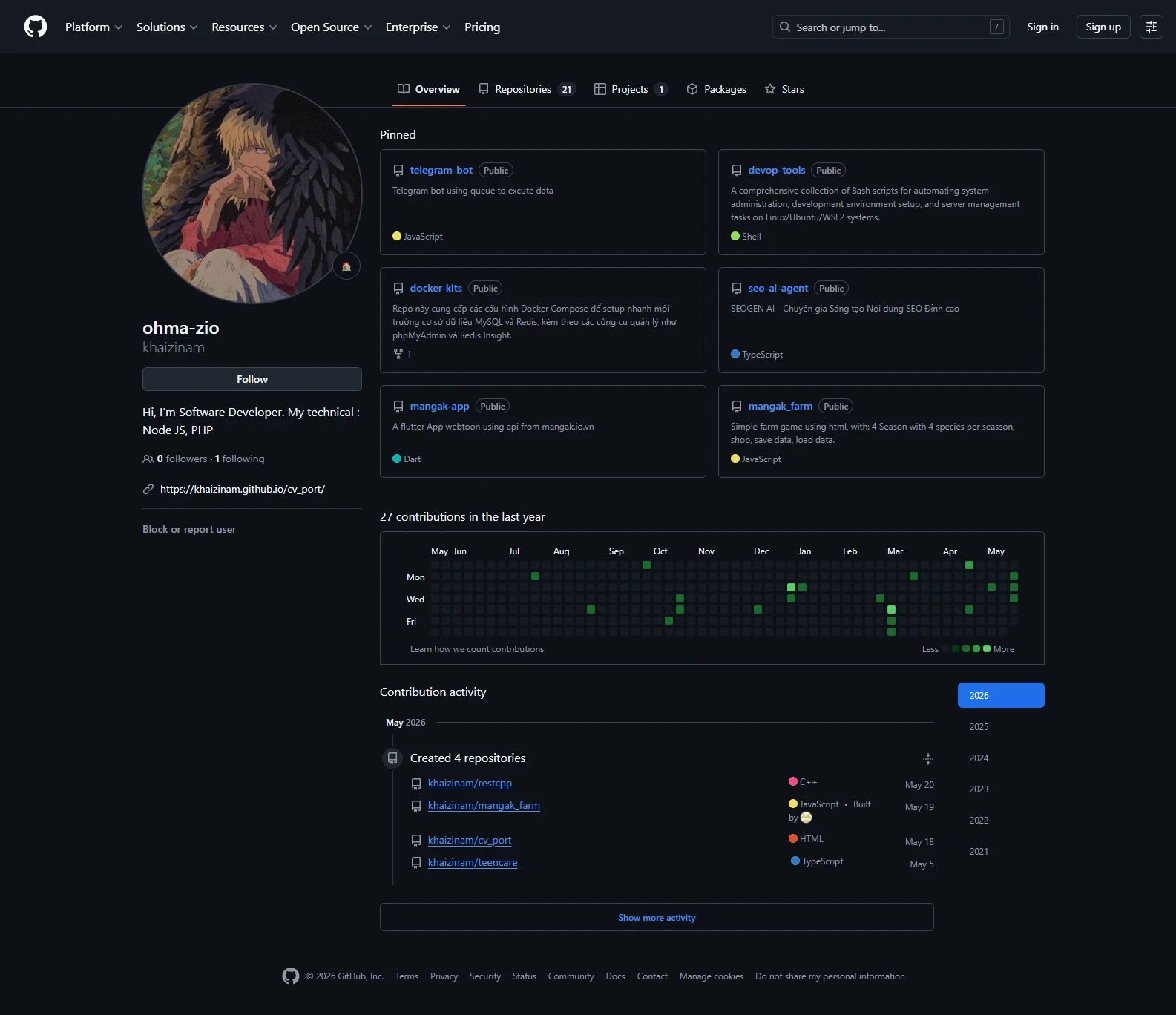
Github is need for your portfolio
2.2. After - fewer repositories, much clearer signal
The same developer after a portfolio cleanup: all forks and class assignments hidden, three self-built projects remaining, each with a complete README including screenshots, a live demo link, problem description, and setup instructions. Pinned repositories placed at the top of the profile. The result: interview callback rate improved noticeably without changing any underlying technical skills - only changing how existing work was presented.
3. Junior developer portfolio checklist - 6 components
A junior developer portfolio doesn’t need to be complex - it needs these six components, each with a clear purpose:
3.1. An optimized GitHub profile
- A real profile photo and your full name (not a random username)
- A short bio: your primary stack and current status (open to work / actively seeking)
- Three to six pinned repositories at the top of your profile - your best work front and center
- A profile README (a README.md in a repository named the same as your username) - brief introduction, tech stack, and contact links
- Commit history showing real activity - not necessarily every day, but consistently showing you’re building things
3.2. Projects with complete READMEs
Every portfolio project needs a README that contains at minimum: the project name and a short description of the problem it solves, the tech stack used, screenshots or a GIF demo, setup instructions that take no more than five steps, and a live demo link if one exists. The README is the first thing a technical lead reads when they open your repository - if there’s no README, that repository effectively doesn’t exist.
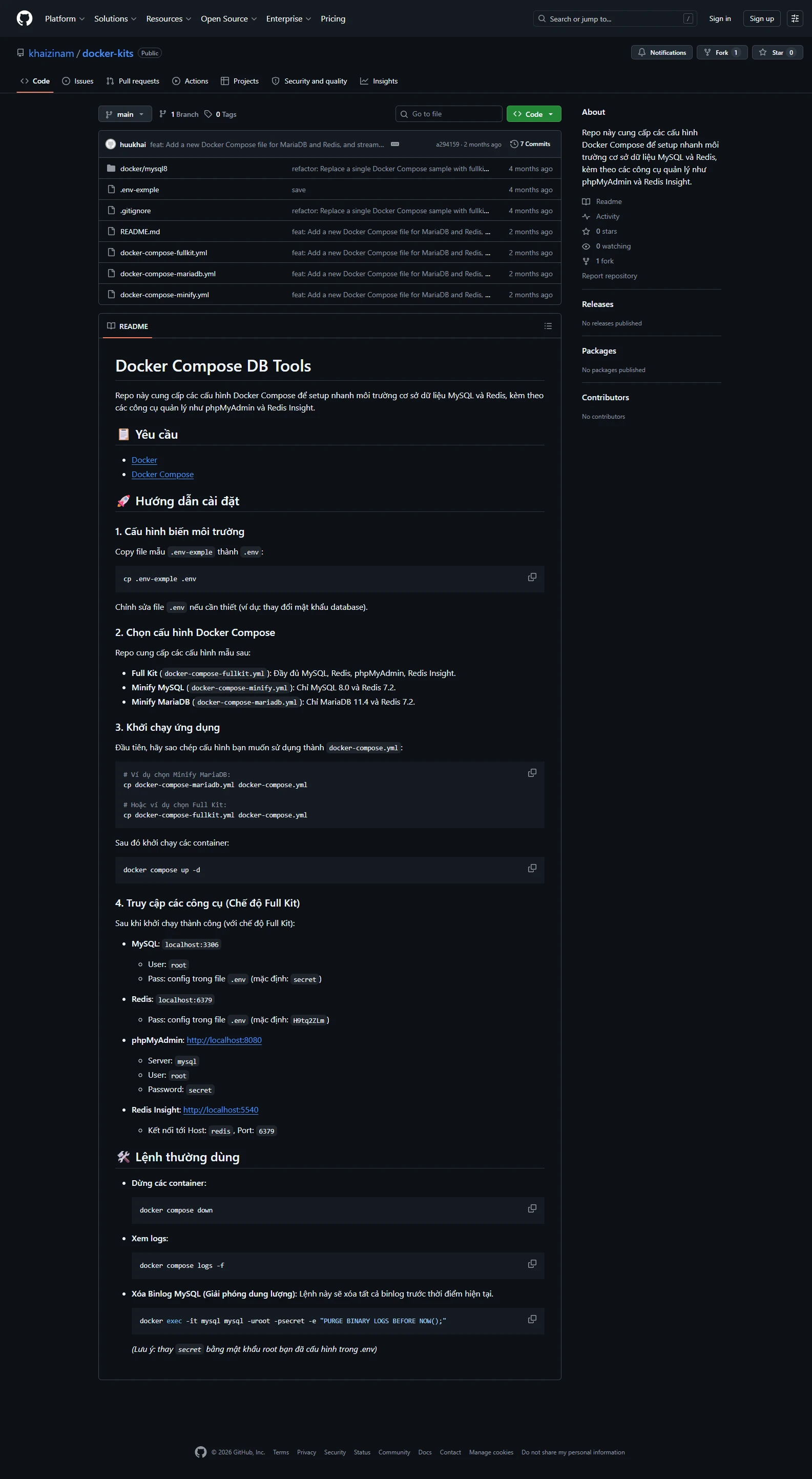
Portfolio readme example
3.3. At least one project with a live demo link
Code on GitHub is necessary but not sufficient - employers want to see something that runs. Deploy at least one project to a free hosting platform: Vercel or Netlify for frontend, Railway or Render for Node.js or Laravel backends. A project that can be seen and interacted with directly, without any setup, creates a far stronger impression than a project that only exists as code.
3.4. A personal portfolio website (optional but a significant advantage)
A simple portfolio website - your name, your stack, a list of projects with links, and contact information - both showcases your frontend skills and serves as a single destination for everything about you. It doesn’t need to be elaborate: a clean HTML/CSS page or a well-chosen template is sufficient. What matters more is that it loads quickly, is fully responsive, and has no visible errors or broken elements.
3.5. A synchronized LinkedIn profile
LinkedIn is where many recruiters actively search for candidates. Your profile needs: a professional headshot, a clear headline (“Frontend Developer | React | Open to Opportunities”), a brief About section that mirrors your CV summary, and links to your GitHub and portfolio website in the Contact Info section. Turn on the “Open to Work” status to appear in recruiter searches.
3.6. A CV that’s consistent with your portfolio
Your CV must include your GitHub and portfolio website links in the header - don’t make recruiters search for them. The Projects section of your CV should list only the two or three most important projects with short descriptions and direct links. If your GitHub and portfolio website show something different from your CV, the inconsistency creates doubt about your attention to detail.
4. Which projects belong in your portfolio - selection criteria
Not every project deserves a place in your portfolio. Here’s the framework for deciding:
4.1. Include these
- Projects that solve a real problem: Even a small one - personal expense tracking, appointment scheduling, habit logging - as long as the problem is genuine, not a fabricated example
- Projects with a technically interesting feature: Authentication, real-time updates, file uploads, payment integration, third-party API - anything that shows you’ve solved a non-trivial technical challenge
- Projects you can explain line by line: If anyone asks about any part of it, you must be able to answer - this is the minimum condition for inclusion
- Projects relevant to the stack you’re applying for: Your portfolio should be adjusted to match the JD - you don’t necessarily need to build something new, but pin the most relevant project to the top
4.2. Leave these out
- Tutorial copy-paste projects: Todo lists, weather apps, and calculators from YouTube tutorials - recruiters recognize them immediately and they add no value
- Projects that don’t run: Broken setup, deprecated dependencies, no instructions - worse than having no project at all
- Projects you don’t understand: Copied from a friend or generated by AI without reading through it - a classic interview trap when the technical lead asks for implementation details
- Too many weak projects: Ten half-finished projects are worse than three complete ones - quality over quantity is the absolute rule for portfolio work
5. Stack-specific checklist: Frontend, Backend, Fullstack
5.1. Frontend Developer (React / Vue)
- At least one complete SPA: routing, state management (Redux / Zustand / Pinia), real API calls
- Responsive design: every project must display correctly on mobile - check with DevTools before sharing the link
- Basic performance: Lighthouse score above 80 for both Performance and Accessibility
- At least one project connected to a real API (not mock data) - REST or GraphQL
- Deployed to Vercel or Netlify, with a custom domain if possible
5.2. Backend Developer (Node.js / Laravel / Spring Boot)
- At least one complete REST API project: authentication (JWT), CRUD with validation, consistent error handling
- A Postman collection or Swagger docs linked in the README - interviewers need a way to test your API
- A clear database schema: an ERD diagram or migration files committed to the repository
- At least one non-trivial technical feature: rate limiting, file uploads, email notifications, webhooks
- Deployed to Railway, Render, or a VPS - the API endpoint should be callable from Postman with no local setup
5.3. Fullstack Developer
- At least one end-to-end project: frontend, backend, and database all built by you - not delegating everything to a BaaS like Firebase
- Clear architecture separation: frontend and backend in separate repos or a well-structured monorepo - not mixed together
- A complete authentication flow: registration, login, refresh token rotation, logout - nearly every company asks about this
- Docker Compose if possible - a single-command dev environment setup is a significant plus for technical interviewers
- A README that explains the overall architecture: why you chose this stack and how the components communicate with each other
6. 6 portfolio mistakes junior developers make
6.1. A GitHub profile full of forks with no original contributions
What it looks like: Forty repositories, thirty-eight of which are forks of other people’s work, commit graph almost entirely grey. Fix: Hide all forks (Settings → only show public repos you created), keep only repos with your own commits, and pin three to six of the most important ones. Fewer repositories, more signal.
6.2. READMEs that are empty or contain one sentence
What it looks like: README says “This is my project” or is left completely blank. Fix: Spend thirty to sixty minutes writing a proper README for each important project. Use this template: Description → Tech Stack → Screenshots → Installation → Usage → License. A good README is what separates a developer who takes their craft seriously from someone who just ships code.
6.3. Broken demo links or projects that require ten steps to run locally
What it looks like: Demo link returns a 404 or “Application Error,” or local setup requires a ten-step process with undocumented dependencies. Fix: Check all demo links at least once a month. Use reliable free-tier platforms (Vercel for frontend is extremely stable, Railway keeps services active with regular traffic). Write local setup instructions that take no more than five steps.
6.4. No projects relevant to the stack you’re applying for
What it looks like: Applying for a Laravel backend role but your portfolio only has React and Python projects. Fix: You don’t need to build something new if you don’t have time - but pin and highlight the most relevant projects to the JD at the top of your profile. If you genuinely have nothing relevant: that’s a signal to build something before applying.
6.5. A portfolio website that’s slow or broken on mobile
What it looks like: The portfolio website - the thing meant to showcase your frontend skills - has a broken layout on mobile or takes five seconds to load. Fix: Test on a real phone before sharing the link. Run it through Google PageSpeed Insights. A broken portfolio website is worse than no portfolio website - it creates the opposite of the impression you intended.
6.6. Including projects you can’t explain in an interview
What it looks like: A project built entirely by AI or copied from someone else, where you haven’t read or understood the codebase. The technical lead asks “why did you choose this approach?” and you can’t answer. Fix: Hard rule: never include anything in your portfolio that you can’t explain at the line level. Two projects you built and understand completely are better than five projects you can’t defend under questioning.
7. Real-world case study
Dung, a fullstack fresher who graduated in May 2024, applied to ten companies in his first month and received only one screening call. His GitHub had forty-five repositories - mostly forks and class assignments, with no meaningful READMEs. After receiving advice from a mentor, he spent three weeks rebuilding his portfolio: hiding forty-two irrelevant repositories, keeping three self-built projects (a Node.js REST API, a React SPA connected to a real API, and a fullstack app with a complete auth flow), writing complete READMEs for all three with screenshots and live demo links on Railway and Vercel, and creating a GitHub profile README introducing himself and his stack. In week four he applied to eight companies and received five screening calls, passed the technical round at three of them, and received two offers. He accepted a position at a startup in Ho Chi Minh City at 11 million VND per month as a Junior Fullstack Developer. The technical lead at the final interview said directly: “Your GitHub showed us that you know how to organize code and can explain what you’ve built - that’s what we were looking for.”
8. FAQ
How many projects do I need in my portfolio?
Three complete projects is the ideal number for a junior developer. Fewer than that doesn’t provide enough variety for a meaningful evaluation. More than five or six requires careful quality control - if any of those projects are weak, hiding them is better than leaving them visible. The rule: each project should add something the previous one didn’t - a new technology, a different problem domain, or a higher level of complexity.
Do I need a separate portfolio website, or is GitHub enough?
GitHub is non-negotiable. A portfolio website is a bonus, not a requirement - but for a frontend role specifically, not having one is a noticeable gap since it’s the most direct demonstration of your skills. For backend developers, a well-organized GitHub profile plus Swagger docs is sufficient. If you do build a portfolio website, make absolutely sure it has no errors and loads quickly - a broken portfolio website is worse than no portfolio website.
Should I include a clone of a popular app like Netflix or Airbnb?
Yes, if you’ve added something genuinely different - a new feature, a solution to a limitation of the original, or a completely different tech stack. A pure clone with nothing added is still better than a tutorial todo app, but not as strong as a project that solves a real problem, however small. What matters more than what you built is whether you can explain the technical decisions you made and the challenges you encountered.
Is it okay to use AI to write code for portfolio projects?
Using AI as a support tool is fine - the same as using Stack Overflow or documentation. The problem is when you paste AI-generated code without reading or understanding it. In a technical interview, the lead will often ask detailed questions about your implementation choices. If you can’t answer questions about code in your own project, that’s a serious red flag. The rule: only include code in your portfolio that you can explain at the line level.
How often should I update my portfolio?
Regularly - especially when you’re actively job searching. A commit history with recent activity (within the past few weeks) signals that you’re actively developing and growing. When applying to different types of roles, adjust your pinned repositories so the most relevant project appears first. For a complete guide to interview preparation, see Junior IT Interview Tips A-Z, and for how to introduce your portfolio during an interview, see IT Interview Self-Introduction Templates.
9. Summary
A junior developer portfolio doesn’t need to be large - it needs to be right. Three complete projects with clear READMEs, at least one live demo link, and a well-organized GitHub profile is the foundation needed to make a strong impression on technical interviewers. The six-component checklist (GitHub profile, complete READMEs, live demo, portfolio website, synced LinkedIn, consistent CV) and clear project selection criteria help you invest your time in the right places instead of building volume without quality. The final and most important principle: only include in your portfolio what you can explain in an interview. The best portfolio is the one that doesn’t create questions you can’t answer.